
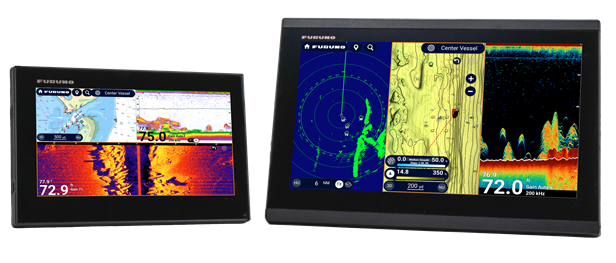
Software Update for Furuno TZMAP & TZTE v26.11
Software Update - September 2026
(TZMAP9 / TZMAP13 / TZT9E / TZT13E)
A new software update for Furuno TZMAP and TZtouchE Displays is now available! The software update is available by via a WIF Over the Air update download in the MFD or via USB Download.
TZMAP and TZTE v26.11 introduces Ehancements to networkable systems, user interface improvements and Fish Finder Improvements.
What's New & Improved:
Enhanced Network Capability for TZMAP and TZTE:
New Yamaha engine systems (Yamaha Command Link, Command Link Plus, and Helm Master EX) can now be connected to display Yamaha Engine pages.
New Digital switching is supported via the standard NMEA 2000 PGN 127501 (Switch Bank Status).
New New partners are added to the NavNet Command Center app.
Enhanced User Interface for TZMAP and TZTE
New An asymmetric screen layout is now available.
New Stern-Up orientation is now supported on Plotter, Radar, and Sonar screens.
New A Dynamic Cursor can be displayed to continuously show the range and bearing to the cursor across Plotter, TZ Weather, Radar, Fish Finder, CHIRP Side Scan, DFF‑3D, and Sonar screens.
New A new option is available to automatically hide the cross cursor.
Improvement Slider-based parameter adjustments are now applied in real time as the slider moves.
Improvement The Smart Search icon is now hidden in split-screen modes.
Improvement Tapping an alarm/notice bar now directly opens the Alarm List page.
Navigation & Charts for TZMAP and TZTE
New Tracks can be protected from unintentional deletion via a contextual menu or from the Tracks List page.
Improvement When activating a route, the default bar shown at the top of the screen now depends on whether a NAVpilot autopilot is connected and which steering mode is active.
New TZ BathyVision charts can now be displayed on the Weather page.
Improvement In the TZ Weather page, touch sensitivity around the bottom bar is improved.
Improvement The Position Jump Alert introduced in V25.21 has been removed.
Sonar Screen (Ethernet Network with CSH-10) for TZTE ONLY
New Charts can now be displayed beneath the Sonar screen.
New Overlay options for ARPA and AIS targets are now available.
New Ten function keys can be assigned for Data Box, and Layer Menu operations.
New Preset programs can be registered from the Layer Menu.
New When a CSH-10 Sonar is networked, two event mark options (Event 1 and Event 2) are available.
New Single-tap behavior for event marking can now be customized.
New New settings, [CHIRP] and [Prop Noise Suppress] (propeller noise suppression), are available in line with updated CSH-10 software (processor application V01.04, etc.).
Improvement Vertical beam width is now displayed in the tilt indicator even in Demo mode.
Improvement The notification [TRANSDUCER NOT RETRACTED] no longer appears in Demo mode.
Improvement The up/down arrows for scrolling within the Sonar Event History window in the Data Box have been enlarged for improved usability.
Improvement Echo rendering for the CSH-10 Sonar at short ranges is improved.
Fish Finder for TZMAP and TZTE
New Bottom Lock and Bottom Zoom modes are now available in full-screen mode.
New Compatibility with DFF3-UHD V3.03 is added to support new features of DFF3-UHD.
Improvement In Demo mode, Single Frequency Mode is displayed for Fish Finder by default.
Other Updates for TZMAP and TZTE
Improvement Once the password is entered, you can immediately toggle the ON/OFF setting or proceed directly to the next menu level without additional steps.
Improvement The Risk Visualizer alarm now activates only when the Risk Visualizer display is enabled on the Plotter or Radar screens.
Improvement In Demo mode, Auto Gain echoes will be played for CHIRP Side Scan by default.
Improvement User objects are properly synchronized with the TZ iBoat app.
Fix The transmission status (TX or STBY) for Fish Finder, CHIRP Side Scan, and DFF-3D is now excluded from Import/Export settings. Configurations exported from older versions that included a TX state will no longer cause a V26.11 unit to begin transmitting unintentionally when imported.
Fix The Quick Access Window will be properly displayed in German menu.
Fix WLAN MAC address will be properly indicated on the Quick Self Test page.
How To Update your Furuno TZMAP/Furuno TZTE
Recent Posts
-
Software Update for Furuno TZMAP & TZTE v26.11
Software Update - September 2026 (TZMAP9 / TZMAP13 / TZT9E / TZT13E) A new software update for Furun …10 Sep 2026 -

Bundle and Save This Black Friday on SIMRAD & Lowrance!
Bundle & Save This Black Friday! Exclusive Savings on Simrad & Lowrance Black Friday is here, and so …20 Nov 2025 -
AutoTrack Software Release for all HALO 20+/24 Radars!
AutoTrack Software Release for HALO 20+/24 Radar Navico Group is excited to announce AutoTrack softw …18 Nov 2025